


• Home
  • News
  • Personal Finance
    • Savings
    • Banking
    • Mortgage
    • Retirement
    • Taxes
    • Wealth
  • Make Money
  • Budgeting
  • Burrow
  • Investing
  • Credit Cards
  • Loans

Subscribe to Updates

Get the latest finance news and updates directly to your inbox.

Top News

Should You Cosign A Loan For Your Adult Child In Retirement?

April 28, 2026

This Little-Known Program Is Why Your Tiny Hometown Airport Has Flights

April 28, 2026

7 Reasons You Shouldn’t Put a Dime Into Anything With the Trump Name on It

April 28, 2026
Facebook Twitter Instagram
Trending
  • Should You Cosign A Loan For Your Adult Child In Retirement?
  • This Little-Known Program Is Why Your Tiny Hometown Airport Has Flights
  • 7 Reasons You Shouldn’t Put a Dime Into Anything With the Trump Name on It
  • Five financial mistakes Americans in their 30s and 40s are making, expert warns
  • You’re Using AI Without Control — And It’s Already a Governance Failure
  • AI Is Inflating Customer Acquisition Costs. Here’s the Fix.
  • This Is the Phrase Barbara Corcoran Used to Overcome Self-Doubt
  • How to Reach More Buyers With Less Effort
Tuesday, April 28
Facebook Twitter Instagram
iSafeSpend
Subscribe For Alerts
  • Home
  • News
  • Personal Finance
    • Savings
    • Banking
    • Mortgage
    • Retirement
    • Taxes
    • Wealth
  • Make Money
  • Budgeting
  • Burrow
  • Investing
  • Credit Cards
  • Loans
iSafeSpend
Home » You can now exchange numbers just by tapping iPhones together. Here’s how to use it
News

You can now exchange numbers just by tapping iPhones together. Here’s how to use it

News RoomBy News RoomOctober 21, 20230 Views0
Facebook Twitter Pinterest LinkedIn WhatsApp Reddit Email Tumblr Telegram

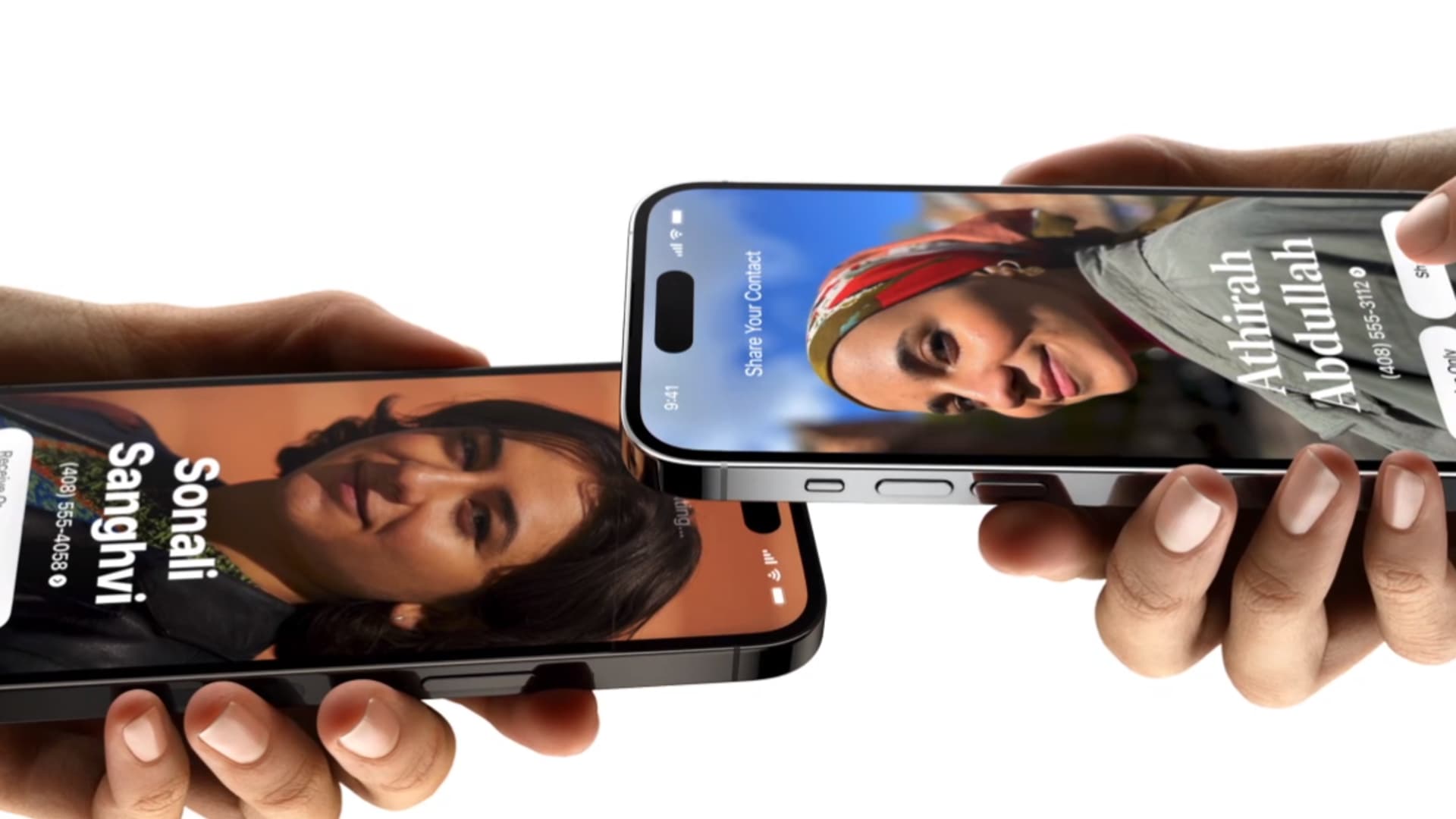
The next time you are at a networking event or dinner party, you can exchange phone numbers with a new colleague or friend just by holding your iPhones near each other.

The feature, known as NameDrop, became available when Apple rolled out iOS 17 in September.

NameDrop is faster than reciting numbers out loud or trading phones and manually punching in contact information. Plus, you don’t have to worry about misspelling your new contact’s name. It just transfers right into your phone.

Apple lets you choose what you share with someone when you use NameDrop, so you won’t accidentally give away sensitive information you might have stored on your phone such as a home address. One drawback: You can’t share your email and phone number at the same time, and you can only NameDrop once between two phones unless you delete the contact and start over.

Here’s how to try it for yourself.

How to use NameDrop in iOS 17 on iPhone to exchange contacts

  • Unlock your iPhone (the feature will not work with your phone locked).
  • Hover the top of one phone just above the top of another phone, like in the picture at the top of this story.
  • Wait roughly three seconds and a prompt will pop up on your screen.
  • You can press “Receive Only” or “Share,” and you can press the down arrow to choose which of your contact information you are about to send.
  • You should both press “Share” to get each other’s contact information.
  • If only one of you needs the contact information, that person should press “Receive Only.” The other person still needs to press “Share” to consent.
  • If you get to this stage and realize you do not want to do either, just swipe up to get out of NameDrop.
  • Once you receive the new contact, you’ll see a contact page. You can tweak the contact in any way you would like, but if it looks good to you, just press “Done” in the top left.

Read the full article here

Share. Facebook Twitter Pinterest LinkedIn Tumblr Email

Related Articles

RSS Feed Generator, Create RSS feeds from URL

News October 25, 2024

X CEO Linda Yaccarino addresses Musk’s ‘go f—- yourself’ comment to advertisers

News November 30, 2023

67-year-old who left the U.S. for Mexico: I’m happily retired—but I ‘really regret’ doing these 3 things in my 20s

News November 30, 2023

U.S. GDP grew at a 5.2% rate in the third quarter, even stronger than first indicated

News November 29, 2023

Americans are ‘doom spending’ — here’s why that’s a problem

News November 29, 2023

Jim Cramer’s top 10 things to watch in the stock market Tuesday

News November 28, 2023
Add A Comment

Leave A Reply Cancel Reply

Demo
Top News

This Little-Known Program Is Why Your Tiny Hometown Airport Has Flights

April 28, 20260 Views

7 Reasons You Shouldn’t Put a Dime Into Anything With the Trump Name on It

April 28, 20260 Views

Five financial mistakes Americans in their 30s and 40s are making, expert warns

April 28, 20260 Views

You’re Using AI Without Control — And It’s Already a Governance Failure

April 28, 20260 Views
Don't Miss

AI Is Inflating Customer Acquisition Costs. Here’s the Fix.

By News RoomApril 28, 2026

Entrepreneur Key Takeaways AI is driving up customer acquisition costs by intercepting search traffic through…

This Is the Phrase Barbara Corcoran Used to Overcome Self-Doubt

April 28, 2026

How to Reach More Buyers With Less Effort

April 28, 2026

How To Interpret And Use Medicare’s Nursing Home Ratings

April 27, 2026
About Us

Your number 1 source for the latest finance, making money, saving money and budgeting. follow us now to get the news that matters to you.

We're accepting new partnerships right now.

Email Us: [email protected]

Our Picks

Should You Cosign A Loan For Your Adult Child In Retirement?

April 28, 2026

This Little-Known Program Is Why Your Tiny Hometown Airport Has Flights

April 28, 2026

7 Reasons You Shouldn’t Put a Dime Into Anything With the Trump Name on It

April 28, 2026
Most Popular

Here’s How Today’s Workers Offset the Rise of AI and Heavy Screen Time

April 21, 20262 Views

Citadel Securities Pays $400,000. Here’s How to Stand Out.

April 21, 20262 Views

Only Hours Left to Save Big on this AI-Powered Stock Picker That’s Perfect for Entrepreneurs

December 7, 20252 Views
Facebook Twitter Instagram Pinterest Dribbble
  • Privacy Policy
  • Terms of use
  • Press Release
  • Advertise
  • Contact
© 2026 iSafeSpend. All Rights Reserved.

Type above and press Enter to search. Press Esc to cancel.